<!-- RTOSafe Help — rendered version: https://rtosafe.com.au/help/appeals-setup -->

# Set Up Your Appeals Process

Set up appeals once, and your public appeals form, timeframes and emails all follow your appeals policy.

***

## Before You Start

Students see your appeals form and policy through your Public Portal, so first:

1. [Switch on your Public Portal](/help/public-portal).
2. [Upload your appeals policy](/help/uploading-policies) and [make it public](/help/public-policies).

***

## Steps

<div class="help-stepper">

<div class="help-step">
<div class="help-step-number">1</div>
<div class="help-step-content">

**Choose your appeals policy**

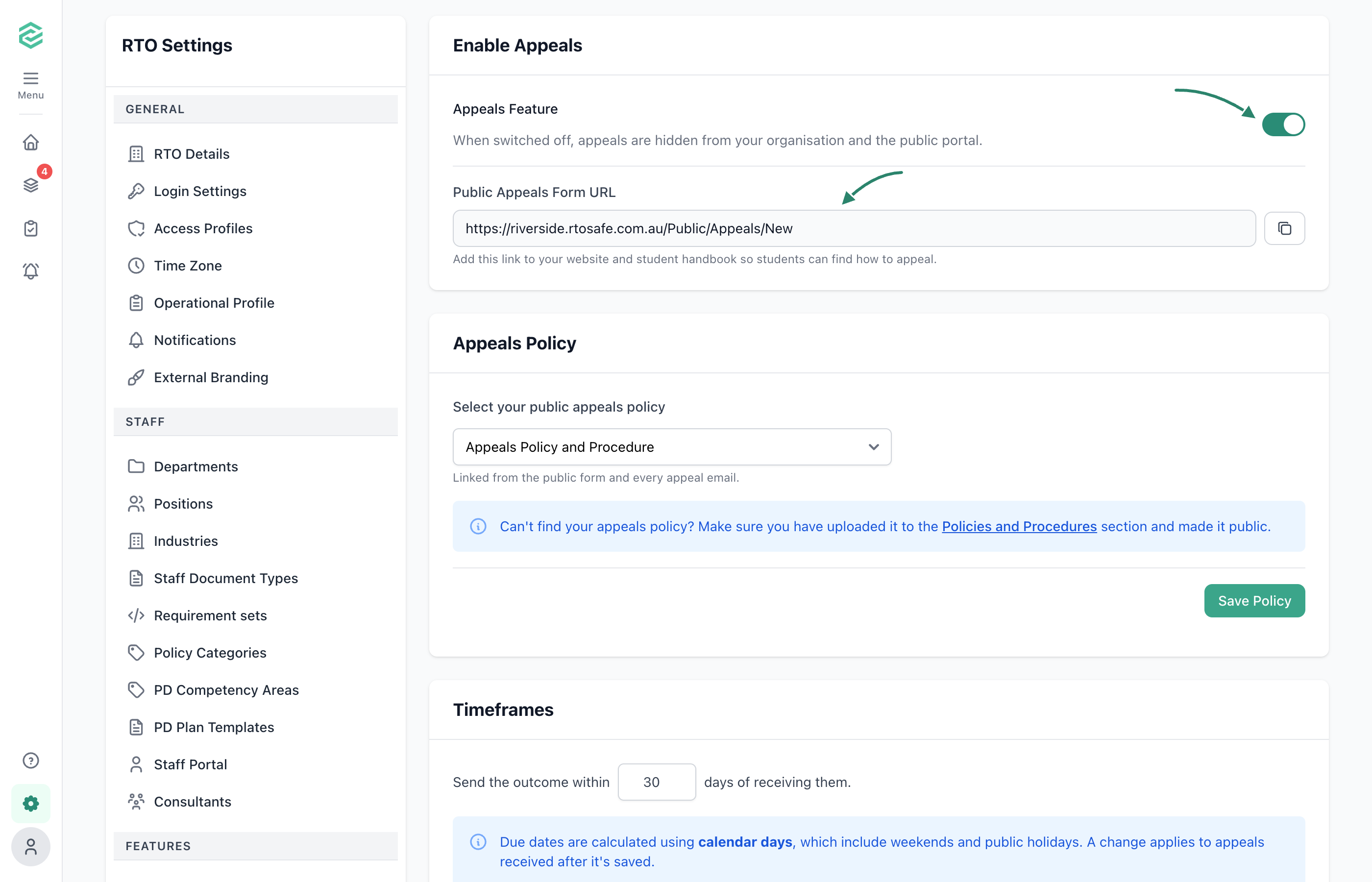
Go to [**Settings → Appeals**](https://app.rtosafe.com.au/AppealsSettings) and select your appeals policy. It's linked from your public form, because Standard 2.8 requires information about how to appeal to be publicly available and easily accessible.

</div>
</div>

<div class="help-step">
<div class="help-step-number">2</div>
<div class="help-step-content">

**Set your timeframes**

Enter how many days you have to send an outcome, and to send your final decision after an appellant asks for an independent review, matching your appeals policy. Standard 2.8 requires your appeals management system to specify reasonable timeframes for actioning appeals.

</div>
</div>

<div class="help-step">
<div class="help-step-number">3</div>
<div class="help-step-content">

**Add other contacts**

Add the organisations appellants can contact if they're still not satisfied, such as the National Training Complaints Hotline. ASQA's practice guide identifies failing to inform students of all avenues for seeking independent review as a risk.

</div>
</div>

<div class="help-step">
<div class="help-step-number">4</div>
<div class="help-step-content">

**Add independent reviewers (optional)**

Save the external reviewers you usually use, and decide whether independent review is free (see [Independent Review Costs](#independent-review-costs)).

</div>
</div>

<div class="help-step">
<div class="help-step-number">5</div>
<div class="help-step-content">

**Switch appeals on**

Turn on appeals, then add your public appeals form link to your website and student handbook.
</div>
</div>

</div>

<figure><img src="/help/assets/appeals-setup-1.png" alt="Settings, Appeals page with arrows pointing to the Appeals Feature switch turned on and the Public Appeals Form URL with its copy button, above the selected appeals policy and the outcome timeframe of 30 days"><figcaption></figcaption></figure>

***

## Independent Review Costs

Standard 2.8 requires avenues for review by an independent party, if requested by the appellant, at no or low cost to the appellant. ASQA's practice guide also expects students to be told about any costs associated with these avenues.

* **If your RTO covers the cost,** tick **Independent review is free for students**, and RTOSafe tells appellants it's free.
* **If there's a cost,** leave it unticked and explain the cost in your appeals policy.

***

## What Happens Next

* Your public appeals form is live. See [Lodge an Appeal](/help/appeals-lodge).
* Choose who's told about new appeals in [**Settings → Notifications**](https://app.rtosafe.com.au/Notifications).
* To hide appeals from some staff, use their [access profile](/help/access-profiles#hiding-complaints-incidents-and-appeals).

***

## Common Issues

<details>
<summary><strong>Why can't I switch appeals on?</strong></summary>

Check that your [Public Portal](/help/public-portal) is on, and that you've chosen an appeals policy and added at least one other contact. The settings page shows what's missing.

</details>

<details>
<summary><strong>Why isn't my appeals policy in the list?</strong></summary>

Only public policies are listed. [Make your policy public](/help/public-policies), then come back.

</details>