
Meeting Register
The meeting register lets you record meetings, capture decisions, and link actions to agenda items. It creates an audit trail of your governance and management meetings.
Why Use the Meeting Register
Auditors want to see that your RTO has functioning governance arrangements. The meeting register provides evidence of:
- Regular governance and management meetings
- Documented decisions with clear approval
- Actions that flow from decisions (tasks, risks, improvements)
- Who was involved and when
Enabling the Meeting Register
The meeting register is optional. To switch it on:
Go to RTO Settings → Meetings
Turn on the Meetings Feature toggle
Once enabled, Meetings appears in your main navigation for all staff.
Only Compliance Admins can enable or disable this feature.
Creating a Meeting
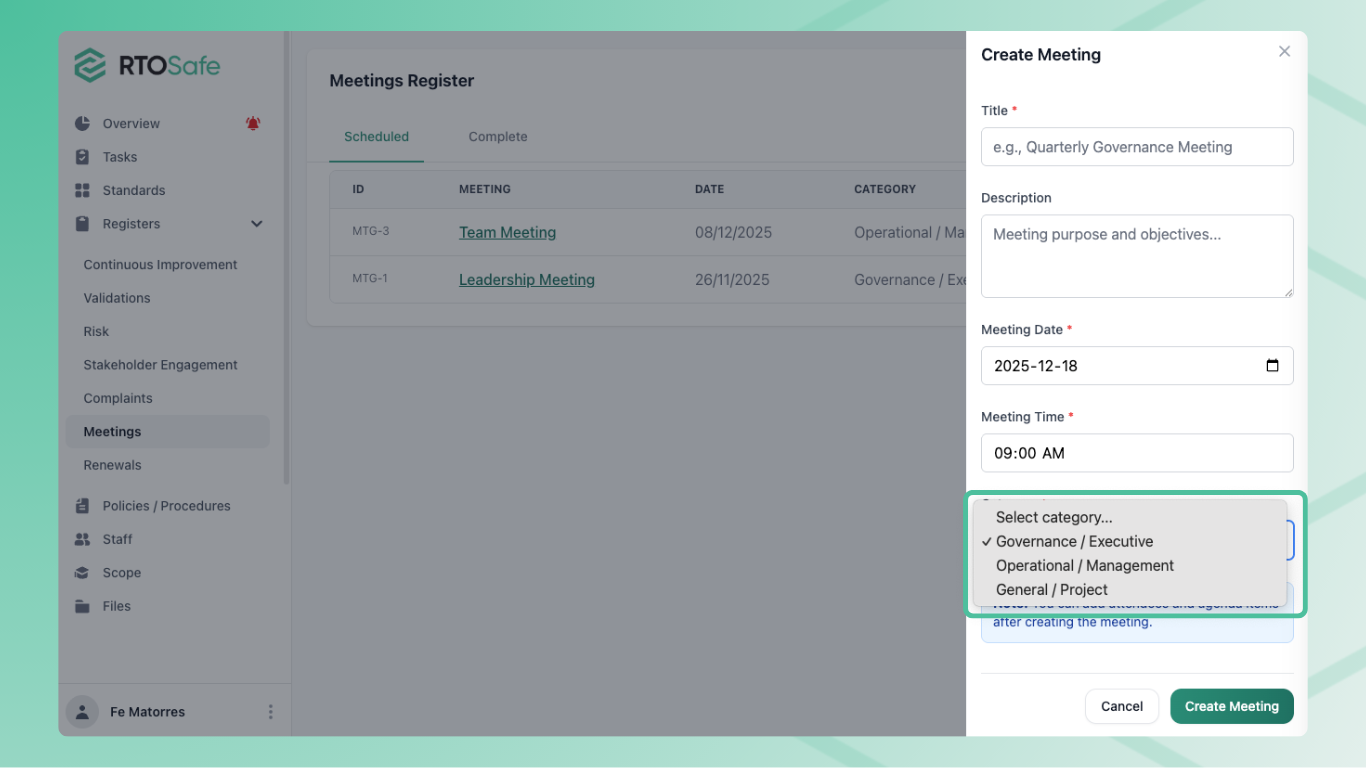
Go to Meetings and select Create
Enter the meeting details:
- Title — a clear name for the meeting
- Date and Time — when the meeting will occur
- Category — choose from Governance / Executive, Operational / Management, or General / Project
- Description (optional) — purpose and objectives
Select Create
New meetings start with Planned status.
Choosing the Right Category
Use categories to organise your register and filter during audits:
| Category | Use for |
|---|---|
| Governance / Executive | Board meetings, executive reviews, strategic decisions |
| Operational / Management | Team meetings, departmental reviews, operational planning |
| General / Project | Project meetings, working groups, ad-hoc discussions |
Adding Agenda Items and Attendees
Open the meeting to add:
- Attendees — search and add staff members or external stakeholders
- Agenda Items — add discussion topics with optional notes
You can reorder agenda items using the move controls.
Recording Decisions
During or after a meeting, add decisions to each agenda item:
- Open the meeting and select an agenda item
- Add a Decision with what was decided and who approved it
- The system records when it was added and by whom
Decisions create a formal record of what your governance body approved.
Linking Actions to Decisions
Each agenda item can link to:
- Tasks — compliance or operational work to complete
- Risks — new or existing risks to manage
- Continuous Improvements — improvement initiatives arising from the discussion
- Documents — meeting papers, reports, or evidence
These links show auditors that your governance decisions result in concrete actions.
Meeting Status
Meetings progress through three statuses:
| Status | When to use |
|---|---|
Planned | Before the meeting takes place |
In Progress | During the meeting |
Completed | After the meeting is finished |
Once a meeting is marked Completed, you can’t add or remove agenda items, decisions, or actions. This preserves the audit trail.